5. Custom font
5.1. Simple Font
- label_widget = tk.Label(parent, font=(font_type, font_size, font_style))
font_type is a font name. e.g "Arial"
font_size is the size of the font. eg. 12
font_style can be bold, italic, underline or a space separated combination
Default Value: System-dependent (usually a default font)
Description: Specifies the font family, size, and style for the label text.
Example: To use a 12-point Arial font, use font=("Arial", 12).
Example: To use a bold 12-point Arial font, use font=("Arial", 12, "bold").
Example: To use a bold underlines 12-point Arial font, use font=("Arial", 12, "bold underline").
5.1.1. font example
import tkinter as tk

# Create the main window
root = tk.Tk()
root.geometry("300x200")  # Set window size
root.title("Label font")  # Set window title

# Create the label widget with options
label = tk.Label(root, text="label text", font=("Arial", 24))

# Pack the label into the window
label.pack()

# Run the main event loop
root.mainloop()

5.2. Custom Font
tkinter.font module that is used to create a new font object.- custom_font = font.Font(family=v_family, size=v_size, weight=v_weight, slant=v_slant)
Parameters
family=v_family Specifies the font family to use. e.g. family="Comic Sans MS"
size=v_size Sets the font size in points.e.g. size=20:
weight=v_weight Sets the font weight. e.g. weight="bold". e.g. weight="normal".
slant=v_slant Makes the font italic or normal. e.g slant="italic". Other possible values include "roman" (normal, upright text).
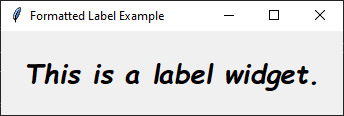
5.2.1. custom font example
This code below uses a font object to style text in a Tkinter Label.
import tkinter as tk
from tkinter import font

# Create the main window
root = tk.Tk()
root.title("Label Custom Font")

# Define the custom font
custom_font = font.Font(family="Comic Sans MS", size=20, weight="bold", slant="italic")

# Create a Label widget using the custom font
label = tk.Label(root, text="This is a label widget.", font=custom_font)
label.pack(padx=20, pady=20)

# Run the Tkinter event loop
root.mainloop()