4. Reindeer
4.1. Game features
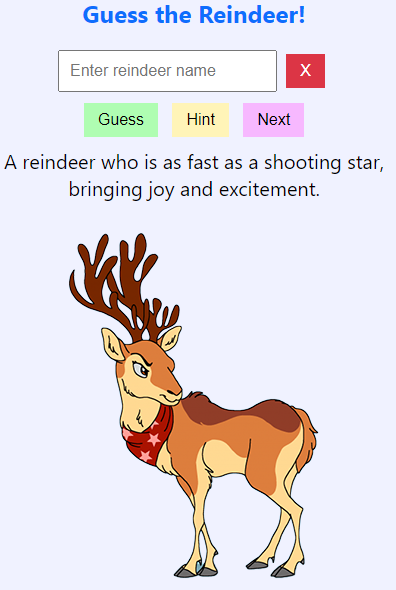
This game combines Python and HTML through PyScript to create a reindeer guessing game.
PyScript Integration: The game uses PyScript to interact with HTML elements and handle events. Modules like document, display, and when are imported from PyScript.
Reindeer Data: A list of reindeer names and a dictionary containing their images and descriptions are defined. This data is used to display information about each reindeer.
Randomization: The reindeer list is shuffled using random.sample to ensure a random order each time the game is played.
Event Handling: The game uses the @when decorator to handle various events:
Start Again: Resets the game, selects a new reindeer, and updates the display.
Make Guess: Handles guesses made by clicking a button or pressing the Enter key.
Get Hint: Provides hints by revealing the initial letters of the reindeer's name.
Clear Guess: Clears the input field for new guesses.
Game Logic: The main game logic includes:
Starting the Game: The start_again function initializes the game state and displays the first reindeer.
Making Guesses: The guess_reindeer function checks if the player's guess is correct and provides feedback.
Providing Hints: The give_hint function gives incremental hints based on the reindeer's name.
Clearing Input: The clear_guess function clears the input field for new guesses.
Dynamic Display: The game dynamically updates the HTML content to show reindeer images and descriptions, as well as feedback messages and hints.
Global Variables: Variables like hint_count, chosen_reindeer, reindeer_index, and shuffled_reindeer_list are used to maintain the game state across different functions.
4.2. Files
Add an image folder and add images of each reindeer.
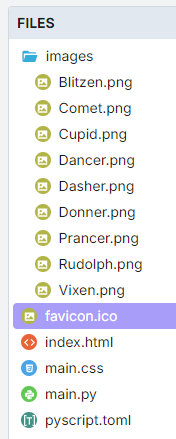
The favicon.ico is optional. It shows as a small icon in the browser tab when the app is run.
4.3. toml configuration file
name = "Reindeer"
description = "A reindeer name guessing game"
4.4. index.html
Input Field: An input box where players can type their guesses for the reindeer's name.
Buttons: Several buttons to interact with the game:
Start Again: To reset the game and start with a new reindeer.
Make Guess: To submit the player's guess.
Get Hint: To receive a hint about the reindeer's name.
Clear Guess: To clear the input field.
Output Areas:
Description: To show the description of the current reindeer.
Image Container: To display the image of the current reindeer.
Output: To show feedback messages and hints.
<!-- GMC Dec 2024 -->
<!DOCTYPE html>
<html lang="en">
<head>
    <title>Christmas Guessing Game</title>
    <!-- Recommended meta tags -->
    <meta charset="UTF-8">
    <meta name="viewport" content="width=device-width,initial-scale=1.0">

    <!-- favicon to appear in browser tab -->
    <link rel="icon" href="favicon.ico" type="image/x-icon">

    <!-- PyScript CSS -->
    <link rel="stylesheet" href="https://pyscript.net/releases/2025.11.2/core.css">

    <!-- This script tag bootstraps PyScript -->
    <script type="module" src="https://pyscript.net/releases/2025.11.2/core.js"></script>

    <!-- custom CSS -->
    <link rel="stylesheet" href="main.css">
</head>


<body id="screenshot-area">
    <h2>Guess the Reindeer!</h2>
    <div id="input">
        <input type="text" id="guess" placeholder="Enter reindeer name">
        <button id="clear_guess">X</button>
    </div>
    <div id="input_buttons">
        <button id="make_guess">Guess</button>
        <button id="get_hint">Hint</button>
        <button id="start_again">Next</button>
    </div>
    <div id="description"></div>
    <div id="output"><p>  </p></div>
    <div id="image_container"></div>
    <script type="py" src="./main.py" config="./pyscript.toml"></script>
</body>
</html>
4.5. main css:
The custom css is below.
body {
    font-family: 'Segoe UI', Tahoma, Geneva, Verdana, sans-serif;
    font-size: 16px;
    margin: 5px; /* Override margin */
    padding: 5px;
    background-color: #f0f2ff;
    text-align: center;
}

div {
    margin: 5px;
}

#description {
    font-size: 20px;
}

#output {
    min-height: 22px;
}

h1, h2 {
    color: #0d6efd;
}

input {
    padding: 10px;
    font-size: 16px;
}

button {
    padding: 8px 14px;
    font-size: 16px;
    color: black;
    border: none;
/*     cursor: pointer; */
    margin: 5px;
}

#clear_guess {
background-color: #dc3545; /* Bootstrap danger */
color: white;
}

#clear_guess:hover {
background-color: #b02a37; /* Bootstrap danger-dark */
}

#make_guess {
    background-color: #affdb2; /* Green */
}

#make_guess:hover {
    background-color: #04a90a;
    color: white;
}

#get_hint {
    background-color: #fff4b8; /* Yellow */
}

#get_hint:hover {
    background-color: #ad8200;
    color: white;
}

#start_again {
    background-color: #f7b8ff;
}

#start_again:hover {
    background-color: #9900ad;
    color: white;
}
4.6. main.py
The python code is below.
# Import the document and display modules from pyscript
from pyscript import document
from pyscript import display
from pyscript import when
import random
import time

reindeer_list = ["Blitzen", "Comet", "Cupid", "Dancer", "Dasher", "Donner", "Prancer", "Rudolph", "Vixen"]
reindeer_info = {
            "Blitzen": ("Blitzen.png", "Known for his speed and lightning-fast abilities."),
            "Comet": ("Comet.png", "A reindeer who is as fast as a shooting star, bringing joy and excitement."),
            "Cupid": ("Cupid.png", "Spreads love and cheer during the holiday season."),
            "Dancer": ("Dancer.png", "Loves to dance and brings a lively spirit to the team."),
            "Dasher": ("Dasher.png", "The fastest reindeer, always leading the way."),
            "Donner": ("Donner.png", "Strong and dependable, often paired with Blitzen."),
            "Prancer": ("Prancer.png", "Graceful and elegant, always prancing with joy."),
            "Rudolph": ("Rudolph.png", "Famous for his glowing red nose, guiding Santa's sleigh through foggy nights."),
            "Vixen": ("Vixen.png", "Mischievous and playful, adding fun to the journey.")
        }

shuffled_reindeer_list = random.sample(reindeer_list, len(reindeer_list))
reindeer_index = 0

@when("click", "#start_again")
def start_again():
    global hint_count, chosen_reindeer, reindeer_index, shuffled_reindeer_list
    hint_count = 0
    # Select the next reindeer in the shuffled list
    chosen_reindeer = shuffled_reindeer_list[reindeer_index]
    reindeer_index += 1
    # Reshuffle the list if we've gone through all reindeers
    if reindeer_index >= len(shuffled_reindeer_list):
        shuffled_reindeer_list = random.sample(reindeer_list, len(reindeer_list))
        reindeer_index = 0
    # clear ouput, display description and image
    display(" ", target="#output", append=False)
    reindeer_img, reindeer_description = reindeer_info[chosen_reindeer]
    reindeer_img =  "images/" + reindeer_img
    display(reindeer_description, target="#description", append=False)
    image_container = document.querySelector("#image_container")
    image_container.innerHTML = f'<img src="{reindeer_img}" alt="Reindeer">'
    clear_guess()

@when("click", "#make_guess")
def make_guess_by_click():
    guess_reindeer()

@when("keypress", "#guess")
def make_guess_by_enter(event):
    if event.key == "Enter":
        guess_reindeer()

def guess_reindeer():
    global hint_count,chosen_reindeer
    guess = document.querySelector("#guess").value
    if guess.capitalize() == chosen_reindeer:
        if hint_count > 0:
            message = f"Correct! It was {chosen_reindeer}! You used {hint_count} hint(s)."
        else:
            message = f"Correct! It was {chosen_reindeer}!"
    else:
        message = f"That's not the right reindeer. Try again!"
    display(message, target="#output", append=False)

@when("click", "#get_hint")
def give_hint():
    global hint_count,chosen_reindeer
    if hint_count < len(chosen_reindeer) - 1:
        hint_count += 1
        hint = chosen_reindeer[:hint_count]
        display(f"Hint: The reindeer's name starts with '{hint}'.", target="#output", append=False)
    else:
        display("No more hints available!", target="#output", append=False)
    # always place hint
    guess_element = document.querySelector("#guess")
    guess_element.value = chosen_reindeer[:hint_count]
    guess_element.focus()

@when("click", "#clear_guess")
def clear_guess():
    guess_element = document.querySelector("#guess")
    guess_element.value = ""

def main():
    # code to run when the page is loaded
    start_again()

main()
Tasks
Add a scoring system.