6. tkinter constants
6.1. Useful constants
6.2. Other constants
6.3. Booleans
tk.NO=tk.FALSE=tk.OFF=0
tk.YES=tk.TRUE=tk.ON=1
6.4. -tabs
tk.NUMERIC='numeric'
6.5. -align
tk.BASELINE='baseline'
6.6. -bordermode
tk.INSIDE='inside'
tk.OUTSIDE='outside'
6.8. Canvas state
tk.HIDDEN='hidden'
6.9. Example usage
tkinter constants. Each constant is shown inside its own grid cell, together with a small widget that visually illustrates how the constant behaves.Anchor constants:
N,S,E,W,CENTER(controls text alignment inside a widget)Sticky constants:
N,S,E,W,NSEW(controls how widgets stretch inside a grid cell)Side constants:
LEFT,RIGHT,TOP,BOTTOM(controls packing direction)Fill constants:
X,Y,BOTH(controls how widgets expand when packed)Relief constants:
RAISED,SUNKEN,RIDGE,GROOVE,SOLID,FLAT(controls border style)Orient constants:
HORIZONTAL,VERTICAL(used by widgets such as Scale and Scrollbar)Wrap constants:
WORD,CHAR(controls text wrapping in Text widgets)State constants:
NORMAL,DISABLED(controls widget interactivity)Special text positions:
END,INSERT(used when inserting text into widgets such as Text and Entry)
6.10. Syntax
- anchor=<tk.ANCHOR_CONSTANT or "anchor_string">
- Controls internal alignment of text or content inside a widget.Formal values:
tk.N,tk.S,tk.E,tk.W,tk.NE,tk.NW,tk.SE,tk.SW,tk.CENTER.Informal string values:"n","s","e","w","ne","nw","se","sw","center".Example (formal):Label(root, anchor=tk.W)Example (informal):Label(root, anchor="w")
- sticky=<tk.STICKY_CONSTANT or "sticky_string">
- Controls how a widget expands to fill its grid cell.Formal values:
tk.N,tk.S,tk.E,tk.W,tk.NSEW.Informal string values:"n","s","e","w","ns","ew","nsew".Example (formal):frame.grid(sticky=tk.NSEW)Example (informal):frame.grid(sticky="nsew")
- side=<tk.SIDE_CONSTANT or "side_string">
- Controls which side of the parent a widget is packed against.Formal values:
tk.LEFT,tk.RIGHT,tk.TOP,tk.BOTTOM.Informal string values:"left","right","top","bottom".Example (formal):button.pack(side=tk.LEFT)Example (informal):button.pack(side="left")
- fill=<tk.FILL_CONSTANT or "fill_string">
- Controls how a widget expands when packed.Formal values:
tk.X,tk.Y,tk.BOTH,tk.NONE.Informal string values:"x","y","both","none".Example (formal):button.pack(fill=tk.X)Example (informal):button.pack(fill="x")
- relief=<tk.RELIEF_CONSTANT or "relief_string">
- Controls the 3D border style of a widget.Formal values:
tk.FLAT,tk.RAISED,tk.SUNKEN,tk.GROOVE,tk.RIDGE,tk.SOLID.Informal string values:"flat","raised","sunken","groove","ridge","solid".Example (formal):Frame(root, relief=tk.RIDGE)Example (informal):Frame(root, relief="ridge")
- orient=<tk.ORIENT_CONSTANT or "orient_string">
- Controls orientation of directional widgets such as
ScaleorScrollbar.Formal values:tk.HORIZONTAL,tk.VERTICAL.Informal string values:"horizontal","vertical".Example (formal):Scale(root, orient=tk.VERTICAL)Example (informal):Scale(root, orient="vertical")
- wrap=<tk.WRAP_CONSTANT or "wrap_string">
- Controls text wrapping behavior in
Textwidgets.Formal values:tk.WORD,tk.CHAR,tk.NONE.Informal string values:"word","char","none".Example (formal):Text(root, wrap=tk.WORD)Example (informal):Text(root, wrap="word")
- state=<tk.STATE_CONSTANT or "state_string">
- Controls widget interactivity.Formal values:
tk.NORMAL,tk.DISABLED,tk.ACTIVE(some widgets),tk.READONLY(Entry only).Informal string values:"normal","disabled","active","readonly".Example (formal):Entry(root, state=tk.DISABLED)Example (informal):Entry(root, state="disabled")
- index=<tk.TEXT_INDEX or "index_string">
- Special text positions used when inserting or deleting text.Formal values:
tk.END,tk.INSERT.Informal string values:"end","insert", or explicit positions like"1.0".Example (formal):text.insert(tk.END, "Hello")Example (informal):text.insert("end", "Hello")
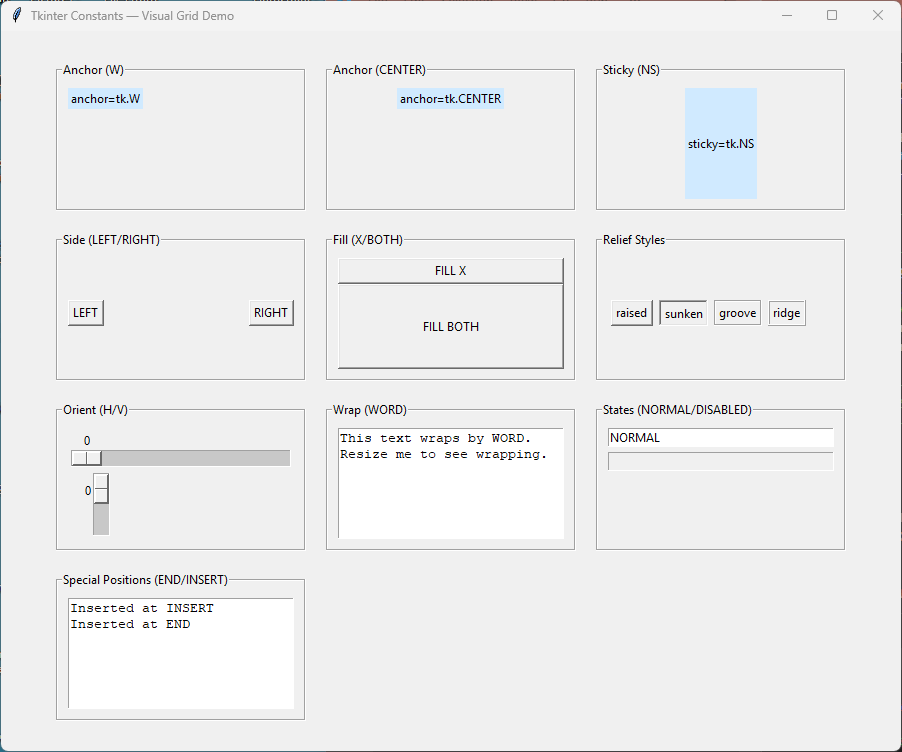
  1import tkinter as tk
  2
  3root = tk.Tk()
  4root.title("Tkinter Constants — Visual Grid Demo")
  5root.geometry("900x720")
  6root.configure(bg="#f0f0f0")
  7
  8# Helper to create labeled demo cells
  9def make_cell(parent, title, widget_fn):
 10    frame = tk.LabelFrame(parent, text=title, padx=10, pady=10)
 11    frame.pack_propagate(False)
 12    frame.configure(width=250, height=150)
 13    frame.grid_propagate(False)
 14    widget_fn(frame)
 15    return frame
 16
 17# ---------------------------------------------------------
 18# GRID CONTAINER
 19# ---------------------------------------------------------
 20grid = tk.Frame(root, bg="#f0f0f0")
 21grid.pack(padx=20, pady=20)
 22
 23# ---------------------------------------------------------
 24# 1. ANCHOR DEMOS
 25# ---------------------------------------------------------
 26def anchor_demo(parent):
 27    lbl = tk.Label(parent, text="anchor=tk.W", bg="#d0eaff")
 28    lbl.pack(anchor=tk.W)
 29
 30def anchor_center_demo(parent):
 31    lbl = tk.Label(parent, text="anchor=tk.CENTER", bg="#d0eaff")
 32    lbl.pack(anchor=tk.CENTER)
 33
 34# ---------------------------------------------------------
 35# 2. STICKY DEMOS
 36# ---------------------------------------------------------
 37def sticky_demo(parent):
 38    lbl = tk.Label(parent, text="sticky=tk.NS", bg="#d0eaff")
 39    parent.grid_rowconfigure(0, weight=1)
 40    parent.grid_columnconfigure(0, weight=1)
 41    lbl.grid(row=0, column=0, sticky=tk.NS)
 42
 43# ---------------------------------------------------------
 44# 3. SIDE DEMOS
 45# ---------------------------------------------------------
 46def side_demo(parent):
 47    tk.Button(parent, text="LEFT").pack(side=tk.LEFT)
 48    tk.Button(parent, text="RIGHT").pack(side=tk.RIGHT)
 49
 50# ---------------------------------------------------------
 51# 4. FILL DEMOS
 52# ---------------------------------------------------------
 53def fill_demo(parent):
 54    tk.Button(parent, text="FILL X").pack(fill=tk.X)
 55    tk.Button(parent, text="FILL BOTH").pack(fill=tk.BOTH, expand=True)
 56
 57# ---------------------------------------------------------
 58# 5. RELIEF DEMOS
 59# ---------------------------------------------------------
 60def relief_demo(parent):
 61    for relief in [tk.RAISED, tk.SUNKEN, tk.GROOVE, tk.RIDGE]:
 62        tk.Button(parent, text=relief, relief=relief).pack(side=tk.LEFT, padx=3)
 63
 64# ---------------------------------------------------------
 65# 6. ORIENT DEMOS
 66# ---------------------------------------------------------
 67def orient_demo(parent):
 68    tk.Scale(parent, from_=0, to=100, orient=tk.HORIZONTAL).pack(fill=tk.X)
 69    tk.Scale(parent, from_=0, to=100, orient=tk.VERTICAL).pack(side=tk.LEFT, fill=tk.Y)
 70
 71# ---------------------------------------------------------
 72# 7. WRAP DEMOS
 73# ---------------------------------------------------------
 74def wrap_demo(parent):
 75    txt = tk.Text(parent, height=4, wrap=tk.WORD)
 76    txt.insert(tk.END, "This text wraps by WORD.\nResize me to see wrapping.")
 77    txt.pack(fill=tk.BOTH, expand=True)
 78
 79# ---------------------------------------------------------
 80# 8. STATE DEMOS
 81# ---------------------------------------------------------
 82def state_demo(parent):
 83    e1 = tk.Entry(parent)
 84    e1.insert(0, "NORMAL")
 85    e1.pack(fill=tk.X)
 86
 87    e2 = tk.Entry(parent, state=tk.DISABLED)
 88    e2.insert(0, "DISABLED")
 89    e2.pack(fill=tk.X, pady=5)
 90
 91# ---------------------------------------------------------
 92# 9. SPECIAL POSITIONS (END, INSERT)
 93# ---------------------------------------------------------
 94def special_demo(parent):
 95    txt = tk.Text(parent, height=4)
 96    txt.pack(fill=tk.BOTH, expand=True)
 97    txt.insert(tk.INSERT, "Inserted at INSERT\n")
 98    txt.insert(tk.END, "Inserted at END\n")
 99
100# ---------------------------------------------------------
101# PLACE CELLS IN A VISUAL GRID
102# ---------------------------------------------------------
103cells = [
104    ("Anchor (W)", anchor_demo),
105    ("Anchor (CENTER)", anchor_center_demo),
106    ("Sticky (NS)", sticky_demo),
107    ("Side (LEFT/RIGHT)", side_demo),
108    ("Fill (X/BOTH)", fill_demo),
109    ("Relief Styles", relief_demo),
110    ("Orient (H/V)", orient_demo),
111    ("Wrap (WORD)", wrap_demo),
112    ("States (NORMAL/DISABLED)", state_demo),
113    ("Special Positions (END/INSERT)", special_demo),
114]
115
116# 3 columns
117cols = 3
118for i, (title, fn) in enumerate(cells):
119    r = i // cols
120    c = i % cols
121    cell = make_cell(grid, title, fn)
122    cell.grid(row=r, column=c, padx=10, pady=10)
123
124root.mainloop()