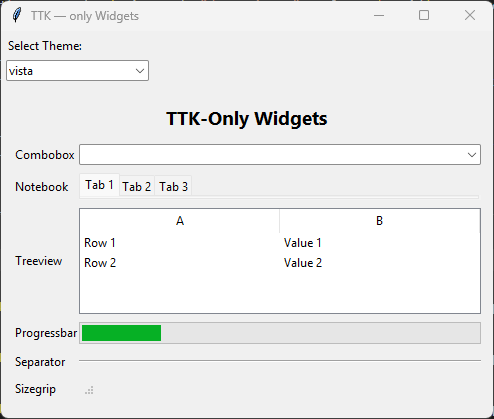
1. Importing tkinter themed widgets
1.1. Classic Tk Widgets:
These widgets were introduced in 1991 and are part of the original Tkinter library.
They have a consistent appearance across platforms but lack the native look and feel.
1.2. Themed Tk Widgets (ttk):
Added in 2007 with Tk 8.5, these widgets are an improved version of the classic ones.
They aim to separate widget behavior from appearance through a styling system.
Themed widgets adapt to the native look and feel of the platform where the program runs.
They are imported from the tkinter.ttk module.
1.3. Advantages of Using Themed Widgets:
Behavior-Appearance Separation: Themed widgets separate code that implements behavior from appearance.
Native Look & Feel: They provide a native look on different platforms.
Simplified State-Specific Behavior: ttk widgets simplify state-specific widget behavior.
1.4. Themed Widgets:
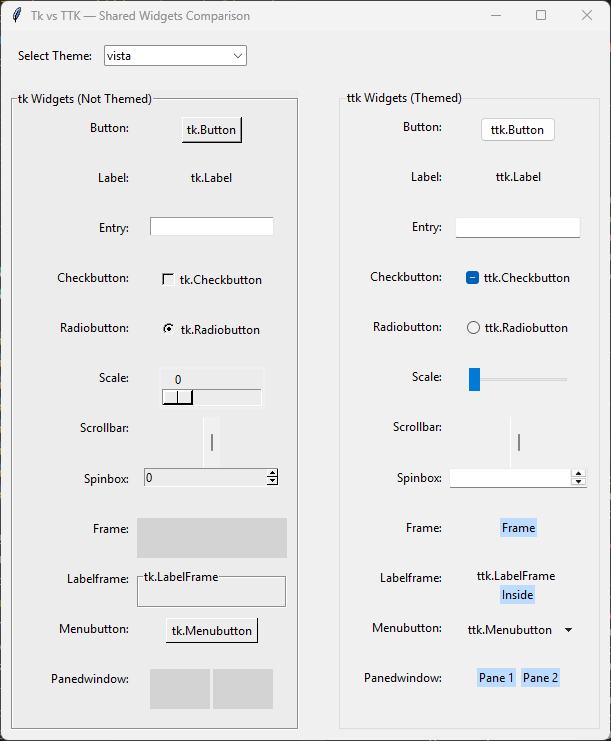
Button: Themed push button (ttk.Button)
Checkbutton: Themed checkbox (ttk.Checkbutton)
Radiobutton: Themed radio button (ttk.Radiobutton)
Label: Text or image display (ttk.Label)
Entry: Single-line text input (ttk.Entry)
Frame: Container widget (ttk.Frame)
Labelframe: Frame with a label border (ttk.Labelframe)
Menubutton: Button that shows a menu (ttk.Menubutton)
Panedwindow: Resizable panes/sash container (ttk.Panedwindow)
Scale: Slider control (ttk.Scale)
Scrollbar: Scrollbar for list, text, canvas, etc. (ttk.Scrollbar)
Spinbox: Numeric/text spinner control (ttk.Spinbox)
Combobox: Drop-down selection + optional text entry (ttk.Combobox)
Notebook: Tabbed interface (ttk.Notebook)
Progressbar: Progress indicator (ttk.Progressbar)
Separator: Visual separator line (ttk.Separator)
Sizegrip: Resize handle, usually in a window corner (ttk.Sizegrip)
Treeview: Hierarchical and tabular data display (ttk.Treeview)
1.5. Comparison of Classic Tk Widgets and Themed Tk Widgets
1.6. New Themed Tk Widgets