1. Elves
1.1. Files
The files used are listed below.
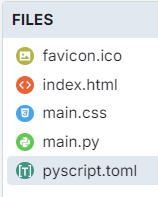
The favicon.ico is optional. It shows as a small icon in the browser tab when the app is run.
1.2. toml configuration file
name = "Elves"
description = "An elf name generator"
1.3. index.html
<link rel="icon" href="favicon.ico" type="image/x-icon"> uses the favicon.ico placed in the files section in the pyscript editor so it shows in a browser tab.<!-- GMC Dec 2024 -->
<!DOCTYPE html>
<html lang="en">
<head>
<title>20_Elves</title>
<!-- Recommended meta tags -->
<meta charset="UTF-8">
<meta name="viewport" content="width=device-width,initial-scale=1.0">
<!-- favicon to appear in browser tab -->
<link rel="icon" href="favicon.ico" type="image/x-icon">
<!-- PyScript CSS -->
<link rel="stylesheet" href="https://pyscript.net/releases/2025.11.2/core.css">
<!-- This script tag bootstraps PyScript -->
<script type="module" src="https://pyscript.net/releases/2025.11.2/core.js"></script>
<!-- CSS only -->
<link rel="stylesheet" href="main.css">
</head>
<body>
<div>
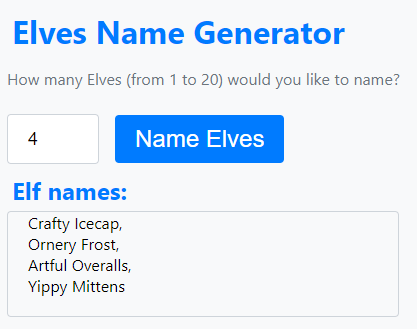
<h1>Elves Name Generator</h1>
<p>How many Elves (from 1 to 20) would you like to name?</p>
</div>
<div style="display: flex; align-items: center;">
<input type="number" min="1" max="20" id="elfnumber" placeholder="1">
<button id="elf_generator">Name Elves</button>
</div>
<div>
<h2>Elf names:</h2>
</div>
<div id="elves">
</div>
<script type="py" src="./main.py" config="./pyscript.toml"></script>
</body>
</html>
1.4. main css:
The custom css is below.
body {
font-family: 'Segoe UI', Tahoma, Geneva, Verdana, sans-serif;
font-size: 16px;
margin: 5px; /* Override margin */
padding: 5px;
background-color: #f8f9fa; /* Bootstrap gray-100 */
}

h1,
h2 {
    color: #007bff;
    margin: 5px;
}

p {
    margin-bottom: 20px;
    color: #6c757d;
}

input[type="number"] {
    max-width: 50px; /* Increase the width */
    height: 28px; /* Increase the height */
    margin-right: 10px;
    padding: 10px 20px; /* Adjust padding as needed */
    border: 1px solid #ced4da;
    border-radius: 0.25rem;
    font-size: 18px; /* Increase the font size */
}

button {
    background-color: #007bff; /* Bootstrap primary */
    border: none;
    color: white;
    padding: 10px 20px; /* Adjust padding as needed */
    text-align: center;
    text-decoration: none;
    display: inline-block;
    font-size: 24px; /* Adjust font size as needed */
    margin: 0.375rem 0.375rem;
    cursor: pointer;
    border-radius: 0.25rem;
    transition: background-color 0.15s ease-in-out;
}

button:hover {
    background-color: #0056b3;
}

#elves {
    margin-top: 0px;
    border: 1px solid #ced4da;
    padding: 0 20px 20px;
    border-radius: 0.25rem;
    min-height: 50px;
    max-width: 350px; /* Increase the width */
}
1.5. main.py
Imports: It imports necessary modules from PyScript and the random module.
Dictionaries: Two dictionaries, firstNames and lastNames, map initials to elf names.
Function get_elves(num): Generates a specified number of random elf names by combining a random first name and last name from the dictionaries.
Function validate_elfnumber(event): Validates the user input for the number of elves, ensuring it's between 1 and 20. If the input is invalid, it sets a default value. This function is called whenever there is an input event on the html element with the ID elfnumber. This ensures that the number of elves entered by the user is validated in real-time.
Function elf_generator(event): This function is called when the element with the ID elf_generator is clicked. It calls validate_elfnumber to ensure the input is valid, generates the elf names using get_elves, and displays the result in the html element with the ID elves.
display is not used in the code below but is ready for use if the "<br>" is not needed in the output.
from pyscript import document
from pyscript import display
from pyscript import when
import random

firstNames = {
    'A': 'Artful', 'B': 'Bouncy', 'C': 'Crafty',
    'D': 'Doodly', 'E': 'Eager', 'F': 'Fizzy',
    'G': 'Giggly', 'H': 'Holly', 'I': 'Inventive',
    'J': 'Jolly', 'K': 'Kindly', 'L': 'Lively',
    'M': 'Mirthful', 'N': 'Noggy', 'O': 'Ornery',
    'P': 'Playful', 'Q': 'Quickfingers', 'R': 'Roly',
    'S': 'Sparkly', 'T': 'Tinkering', 'U': 'Unwrappy',
    'V': 'Vivid', 'W': 'Whimsical', 'X': 'Xylophoney',
    'Y': 'Yippy', 'Z': 'Zesty'
}

lastNames = {
    'A': 'Artisan', 'B': 'Buttons', 'C': 'Cobbler',
    'D': 'Doodles', 'E': 'Elfworthy', 'F': 'Frost',
    'G': 'Giftwrap', 'H': 'Hearth', 'I': 'Icecap',
    'J': 'Jollyboots', 'K': 'Knots', 'L': 'Lollipops',
    'M': 'Mittens', 'N': 'Nutmeg', 'O': 'Overalls',
    'P': 'Pinecone', 'Q': 'Quiltmaker', 'R': 'Rockinghorse',
    'S': 'Stockings', 'T': 'Toymaker', 'U': 'Umbrella',
    'V': 'Velvet', 'W': 'Workshop', 'X': 'Xylophone',
    'Y': 'Yarnspool', 'Z': 'Zingerbell'
}


def get_elves(num):
    elves = ""
    for i in range(num):
        firstInitial = random.choice(list(firstNames.keys()))
        lastInitial = random.choice(list(lastNames.keys()))
        elfName = firstNames [firstInitial] + " " + lastNames [lastInitial]
        if elves == "":
            elves = elfName
        else:
            elves = elves + ", <br>" + elfName
    return elves


@when('input', '#elfnumber')
def validate_elfnumber(event):
    input_text_element = document.getElementById("elfnumber")
    try:
        num = int(input_text_element.value)
        if num < 1 or num > 20:
            if num < 1:
                num = 1
                input_text_element.value = 1
            elif num > 20:
                num = 20
                input_text_element.value =20
    except ValueError:
        num = 1
        input_text_element.value = 1


@when('click', '#elf_generator')
def elf_generator(event):
    validate_elfnumber(event)
    input_text_element = document.getElementById("elfnumber")
    num = int(input_text_element.value)
    elves_text = get_elves(num)
    output_div_text = document.getElementById("elves")
    output_div_text.innerHTML = elves_text
    # display(elves_text, target="#elves", append=False) # doesn't render <br>