6. Add Costs
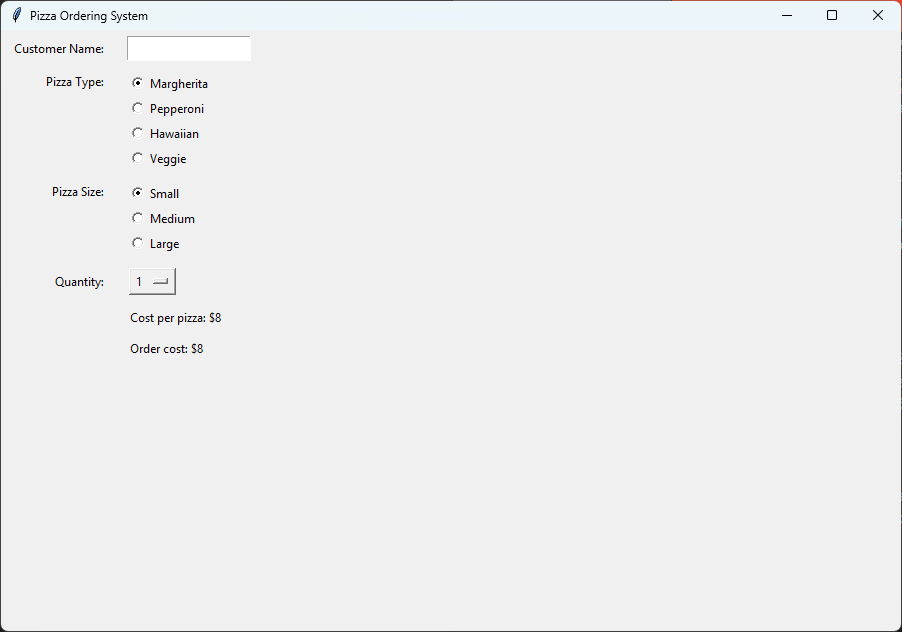
Objective: Add costs.
Content:
Define prices for pizzas
Adding Cost Display Fields
Calculating the cost based on selection.
Updating costs dynamically based on selections.
6.1. Define prices for pizzas
prices is a nested dictionary that stores the prices of different pizza types based on their sizes.# Define the prices for each pizza size
prices = {
"Margherita": {"Small": 8, "Medium": 12, "Large": 15},
"Pepperoni": {"Small": 9, "Medium": 13, "Large": 17},
"Hawaiian": {"Small": 10, "Medium": 14, "Large": 18},
"Veggie": {"Small": 9, "Medium": 12, "Large": 16}
}
prices[pizza_type][pizza_size].prices["Margherita"]["Small"] would return 8, which is the cost of a small Margherita pizza.6.2. Adding Cost Display Fields
6.2.1. Cost per pizza display
# Cost per pizza display
cost_display_var = tk.StringVar(root)
cost_display_var.set("Cost per pizza: $8")

cost_label = tk.Label(root, textvariable=cost_display_var)
cost_label.grid(row=4, column=1, padx=10, pady=5, sticky="w")
cost_display_var = tk.StringVar(root): Creates a StringVar to hold the cost per pizza.cost_display_var.set("Cost per pizza: $8"): initializes the StringVar with the default text "Cost per pizza: $8", and so sets the initial value of the cost display.tk.Label(root, textvariable=cost_display_var): Creates a label that displays the cost per pizza, the value of cost_display_var.The grid method,
.grid(row=4, column=1, padx=10, pady=5, sticky="w"), places the label in the fifth row (row=4), second column (column=1) of the grid layout.padx and pady add padding around the label for better spacing.
sticky="w" aligns the label to the west (left side) of its grid cell.
6.2.2. Order cost display
# order cost display
order_cost_var = tk.StringVar(root)
order_cost_var.set("Order cost: $8")

order_cost_label = tk.Label(root, textvariable=order_cost_var)
order_cost_label.grid(row=5, column=1, padx=10, pady=5, sticky="w")
order_cost_var = tk.StringVar(root): Creates a StringVar to hold the order cost.order_cost_var.set("Order cost: $8"): initializes the StringVar with the default text "Order cost: $8", and so sets the initial value of the order cost display.tk.Label(root, textvariable=order_cost_var): Creates a label that displays the order cost, the value of order_cost_var.The textvariable parameter links the label to the order_cost_var variable, so any changes to order_cost_var will automatically update the label's text.
The grid method places the label in the sixth row (row=5), second column (column=1) of the grid layout.
padx and pady add padding around the label for better spacing.
sticky="w" aligns the label to the west (left side) of its grid cell.
6.3. Calculating the cost based on selection.
update_costs to calculate the cost of a pizza and the order cost.# Costs
def update_costs(*args):
"""Calculates and updates the real-time cost feedback labels."""
pizza = pizza_var.get()
size = size_var.get()
quantity = quantity_var.get()
if pizza and size:
cost = prices[pizza][size]
cost_display_var.set(f"Cost per pizza: ${cost}")
if quantity:
order_cost = cost * quantity
order_cost_var.set(f"Order cost: ${order_cost}")
Function Definition:
def update_costs(*args):
This line defines a function named update_costs that takes any number of arguments (*args).
The *args parameter in a function definition allows the function to accept an arbitrary number of positional arguments. This means you can pass any number of arguments to the function, and they will be accessible within the function.
In the context of Tkinter and event-driven programming, *args is particularly useful for binding functions to multiple events. When an event occurs (like a button click or a change in a widget's value), Tkinter automatically passes event-specific information to the callback function. By using *args, the function can handle these additional arguments without explicitly defining them.
*args is required to make this function compatible with .trace_add() calls.When you use trace_add to monitor changes to Tkinter variables, the callback function (update_costs in this case) automatically receives three arguments:The name of the variable,The index, andThe mode of the variable changeRetrieve Selected Values:
pizza = pizza_var.get() size = size_var.get() quantity = quantity_var.get()
pizza = pizza_var.get() retrieves the selected pizza type from the pizza_var variable.
size = size_var.get() retrieves the selected pizza size from the size_var variable.
quantity = quantity_var.get() retrieves the selected quantity from the quantity_var variable which is an integer.
Calculate Costs:
if pizza and size:
    cost = prices[pizza][size]
    cost_display_var.set(f"Cost per pizza: ${cost}")
    order_cost_var.set(f"Order cost: ${cost * quantity}")
The if pizza and size: condition checks if both a pizza type and size have been selected. Both are True if their variables have been set.
cost = prices[pizza][size] retrieves the cost of the selected pizza type and size from the prices dictionary.
cost_display_var.set(f"Cost per pizza: ${cost}") updates the cost_display_var with the cost of a single pizza.
order_cost_var.set(f"Order cost: ${cost * quantity}") calculates the total order cost by multiplying the cost of a single pizza by the quantity and updates the order_cost_var with this value.
6.4. Updating Costs Dynamically Based on Selections
trace_add is a method of StringVar that allows updating of the costs whenever the pizza type or size changes.trace_add is a method of IntVar that allows updating of the costs whenever the pizza quantity changes.Add this code below to the previous lines of code dealing with pizza_var.
# place after pizza_var.set method
pizza_var.trace_add("write", update_costs)
Add this code below to the previous lines of code dealing with size_var.
# place after size_var.set method
size_var.trace_add("write", update_costs)
Add this code below to the previous lines of code dealing with quantity_var.
# place after quantity_var.set method
quantity_var.trace_add("write", update_costs)
pizza_var.trace_add("write", update_costs):
The trace_add method is used to monitor changes to the StringVar variables. When a change is detected, it triggers the update_costs function.
The "write" mode indicates that the trace should trigger when the variable's value is written or updated.
The update_costs function is called whenever pizza_var changes.
Each time pizza_var changes, Tkinter passes event-specific arguments to update_costs. The *args parameter in update_costs ensures that update_costs can accept these arguments without any issues.
size_var.trace_add("write", update_costs):
This line sets up a trace on the size_var variable.
The update_costs function is called whenever size_var changes.
quantity_var.trace_add("write", update_costs):
This line sets up a trace on the quantity_var variable.
The update_costs function is called whenever quantity_var changes.