12. Rock paper scissors
This app is a computer versus human game of rock paper scissors.
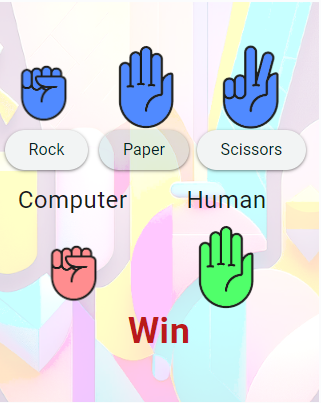
Try it out at: https://pc-rps.anvil.app
12.1. App Theme
Click Create a new app.
In the Choose Theme window choose Material Design 3.
Set the python environment to the latest version.
12.2. Assets
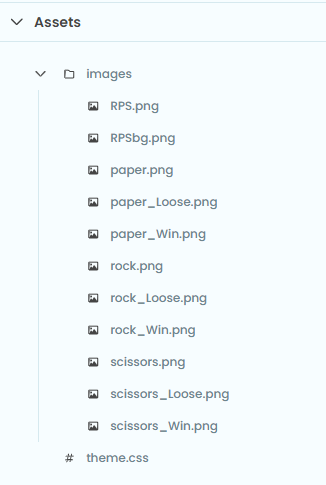
Add image files to assets. Use a folder for the images via Add Folder. First click on the 3 vertical dots to reveal the menu and choose Add Asset. In the Add Asset window, click Choose file and navigate to the image file to add.
Add coloured images for each of rock, paper and scissors to represent a tie, a win and a loss.
12.3. Components
The required components are shown below.
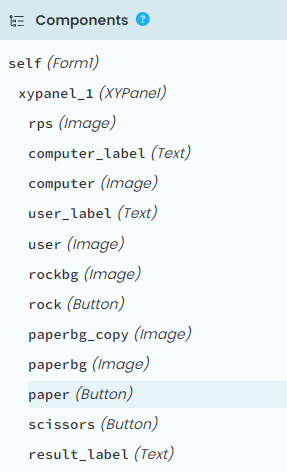
Delete the initial components in the Form1.
Add an XYPanel to the content_panel. Set this width to 320 and height to 400.
Add an image for the background, then 3 buttons and 3 text labels and 5 images to the XYPanel.
12.4. Client Code
Place the code below in the Form1 code.
Run the code to check that it works.
self.images is a dictionary of image paths.
self.user.source and self.computer.source will have their image path updated during each play.
from ._anvil_designer import Form1Template
from anvil import *
import random
import time

class Form1(Form1Template):
    def __init__(self, **properties):
        self.init_components(**properties)
        self.images = {
            "Rock_Win": "_/theme/images/rock_Win.png",
            "Rock_Loose": "_/theme/images/rock_Loose.png",
            "Paper_Win": "_/theme/images/paper_Win.png",
            "Paper_Loose": "_/theme/images/paper_Loose.png",
            "Scissors_Win": "_/theme/images/scissors_Win.png",
            "Scissors_Loose": "_/theme/images/scissors_Loose.png",
            "Rock_Tie": "_/theme/images/rock.png",
            "Paper_Tie": "_/theme/images/paper.png",
            "Scissors_Tie": "_/theme/images/scissors.png"
        }
        self.images_list = list(self.images.values())
        self.choices = ["Rock", "Paper", "Scissors"]

    def rock_click(self, **event_args):
        self.play("Rock")

    def paper_click(self, **event_args):
        self.play("Paper")

    def scissors_click(self, **event_args):
        self.play("Scissors")

    def play(self, user_choice):
        self.result_label.text = None
        computer_choice = random.choice(self.choices)
        computer_result, user_result = self.determine_winner(user_choice, computer_choice)
        self.user.source = self.get_image_source(user_choice, user_result)
        self.computer.source = self.get_image_source(computer_choice, computer_result)
        self.result_label.text = user_result

    def determine_winner(self, user, computer):
        #computer_result, user_result
        if user == computer:
            return "Tie", "Tie"
        elif (user == "Rock" and computer == "Scissors") or \
            (user == "Paper" and computer == "Rock") or \
            (user == "Scissors" and computer == "Paper"):
            return "Loose", "Win"
        else:
            return "Win", "Loose"

    def get_image_source(self, choice, result):
        if result == "Tie":
            return self.images[f"{choice}_Tie"]
        elif result == "Win":
            return self.images[f"{choice}_Win"]
        else:
            return self.images[f"{choice}_Loose"]
Tasks
Add a scoring system.