11. tk Message
11.1. Usage
The
tkinter.Message widget displays multiple lines of read-only text.Unlike a
Label, a Message widget automatically wraps its text to fit within a specified width.It is suitable for displaying paragraphs or longer instructions.
To create a Message widget, the general syntax is (assuming import via
import tkinter as tk):- message_widget = tk.Message(parent, option=value)
parentis the window or frame object.Options can be passed as parameters separated by commas.The text is automatically wrapped according to thewidthoption.
11.2. Message example
The example below displays a paragraph of wrapped text.
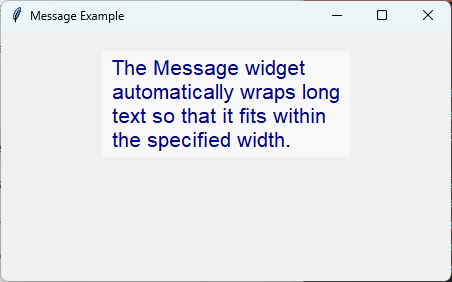
import tkinter as tk

# Create the main window
root = tk.Tk()
root.title("Message Example")
root.geometry("450x250")

# Create the Message widget
message = tk.Message(
    root,
    text="The Message widget automatically wraps long text so that it fits within the specified width.",
    width=250,
    font=("Arial", 16),
    bg="#f8f8f8",
    fg="navy"
)

message.pack(padx=20, pady=20)

# Run the main event loop
root.mainloop()
Tasks
Create a Tkinter application with a window size of 450x250 containing a
Messagewidget. Use the Comic Sans MS font at size 18, a background colour of #fff8dc, a foreground colour of darkgreen, a width of 220 pixels, and display the widget using 20 pixels of padding on each side.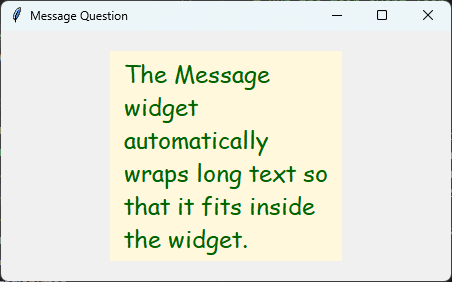
Create the Message widget shown above.
import tkinter as tk

# Create the main window
root = tk.Tk()
root.title("Message Question")
root.geometry("450x250")

message = tk.Message(
    root,
    text="The Message widget automatically wraps long text so that it fits inside the widget.",
    font=("Comic Sans MS", 18),
    bg="#fff8dc",
    fg="darkgreen",
    width=220
)

message.pack(padx=20, pady=20)

root.mainloop()
11.3. Message methods
Message inherits most of its methods from the base Widget class.It does not provide additional widget-specific methods.
Common methods include:
- message_widget.config(option=value)
- Changes one or more configuration options.
- message_widget.cget(option)
- Returns the current value of the specified option.
- message_widget.destroy()
- Removes the widget from the window.
11.4. Option details
- message_widget = tk.Message(parent, option=value)
parentis the window or frame object.Options can be passed as parameters separated by commas.Parameters:
- anchor
- Syntax:
message_widget = tk.Message(parent, anchor="position")Description: Specifies where the text is positioned within the widget.Default:center
- aspect
- Syntax:
message_widget = tk.Message(parent, aspect=value)Description: Specifies the desired aspect ratio (width to height) of the text layout.Default:150
- background
- bg
- Syntax:
message_widget = tk.Message(parent, bg="color")Description: Sets the background colour.Default: SystemButtonFace
- bd
- borderwidth
- Syntax:
message_widget = tk.Message(parent, borderwidth=value)Description: Sets the width of the border.Default:2
- cursor
- Syntax:
message_widget = tk.Message(parent, cursor="cursor_type")Description: Sets the mouse cursor when it is over the widget.
- font
- Syntax:
message_widget = tk.Message(parent, font=("font_name", size, style))Description: Sets the font used to display the text.
- foreground
- fg
- Syntax:
message_widget = tk.Message(parent, fg="color")Description: Sets the text colour.
- justify
- Syntax:
message_widget = tk.Message(parent, justify="alignment")Description: Specifies the alignment of multiple lines of text.Possible values includeleft,centerandright.
- padx
- Syntax:
message_widget = tk.Message(parent, padx=value)Description: Sets the internal horizontal padding.
- pady
- Syntax:
message_widget = tk.Message(parent, pady=value)Description: Sets the internal vertical padding.
- relief
- Syntax:
message_widget = tk.Message(parent, relief="style")Description: Sets the border style.Default:flat
- takefocus
- Syntax:
message_widget = tk.Message(parent, takefocus=boolean)Description: Determines whether the widget can receive keyboard focus.
- text
- Syntax:
message_widget = tk.Message(parent, text="message")Description: Specifies the text displayed by the widget.
- textvariable
- Syntax:
message_widget = tk.Message(parent, textvariable=variable)Description: Associates the displayed text with a Tkinter control variable.
- width
- Syntax:
message_widget = tk.Message(parent, width=pixels)Description: Specifies the width of the widget in pixels.The text is automatically wrapped to fit within this width.
11.5. Default options
Code to display the default value for each
Message option is shown below.import tkinter as tk
root = tk.Tk()
widget = tk.Message(root)
widget_options = widget.keys()
for option in widget_options:
print(f"{option}: {widget.cget(option)}") # cget retrieves the current value of the option